For iPhone & Apple Watch · Free beta
Have your coffee. Still sleep tonight.
Caffeine vs Water tells you, before you drink, whether one more coffee still fits before bed. It counts your usual drinks for you and keeps your water on pace.
Needs an iPhone with iOS 26 or later. Apple emails you the TestFlight invite.
- No account
- No ads
- Apple Watch app included
- Works with Apple Health
Try it now
Is it too late for a coffee?
Pick a drink and when you'd have it. You'll see what it leaves in you at bedtime, the same way the app works it out.
Yes, it fits.
A drip coffee at 3:00 PM leaves about 34 mg at 11:00 PM, under the 50 mg sleep line.
How it works
It thinks ahead, so you don't have to.
Before you drink
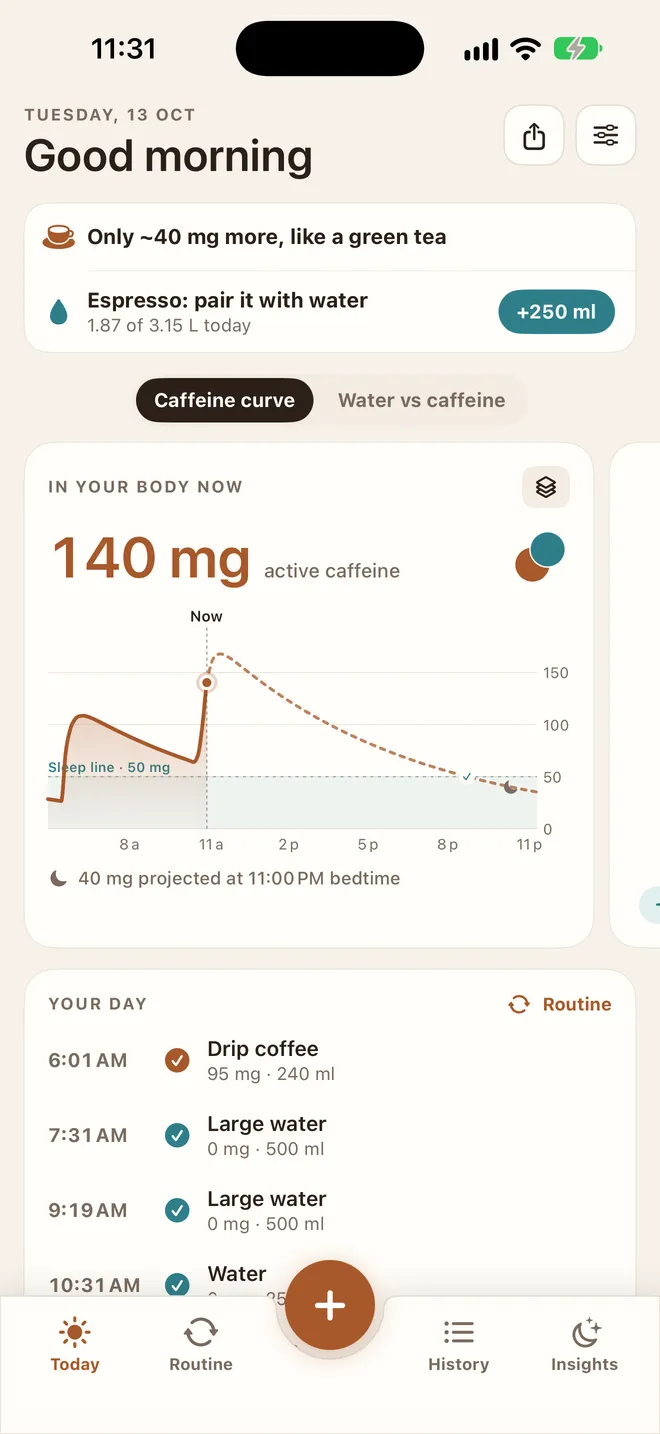
One line tells you where you stand.
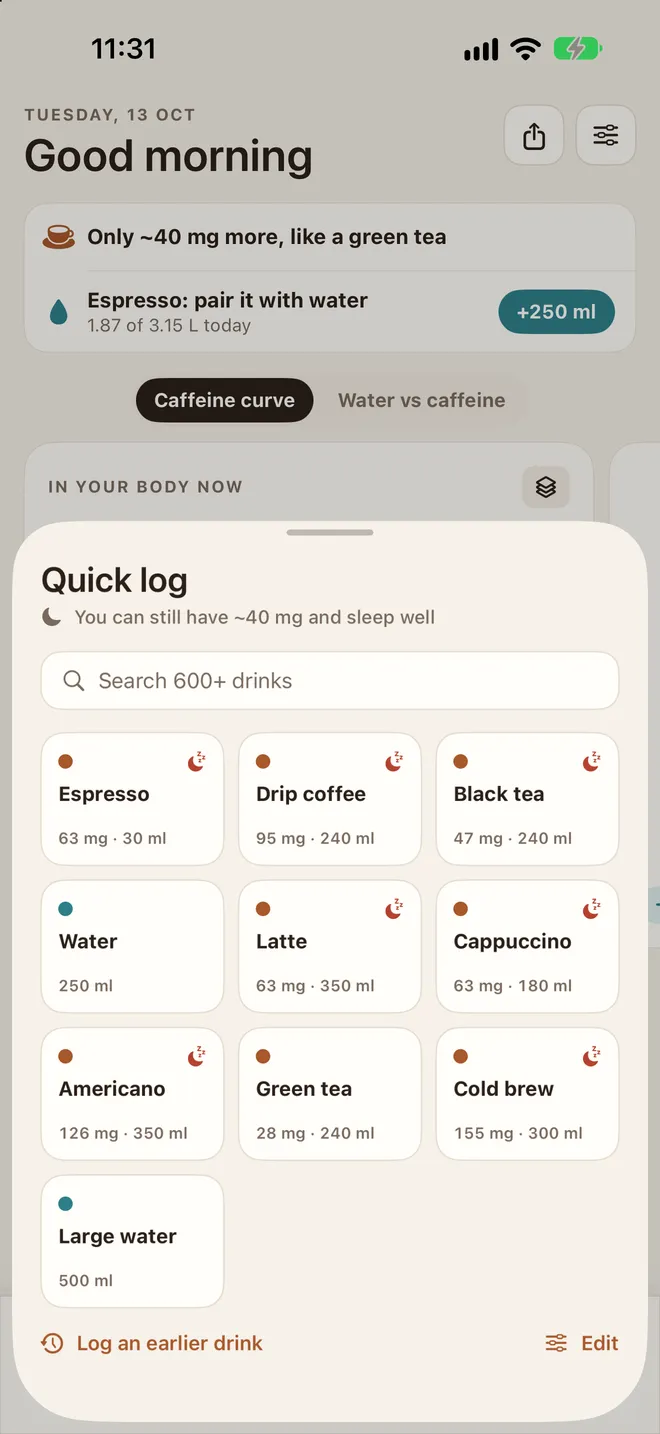
The top of Today says it plainly: Last coffee by 3:40 PM, Only ~40 mg more, like a green tea, or No more caffeine today. In Quick log, drinks that won't fit before bed carry a little moon.
Pick one anyway and it asks first: still in you at bedtime. Swap in a decaf is one tap away.
Your routine
Your usual coffee counts itself.
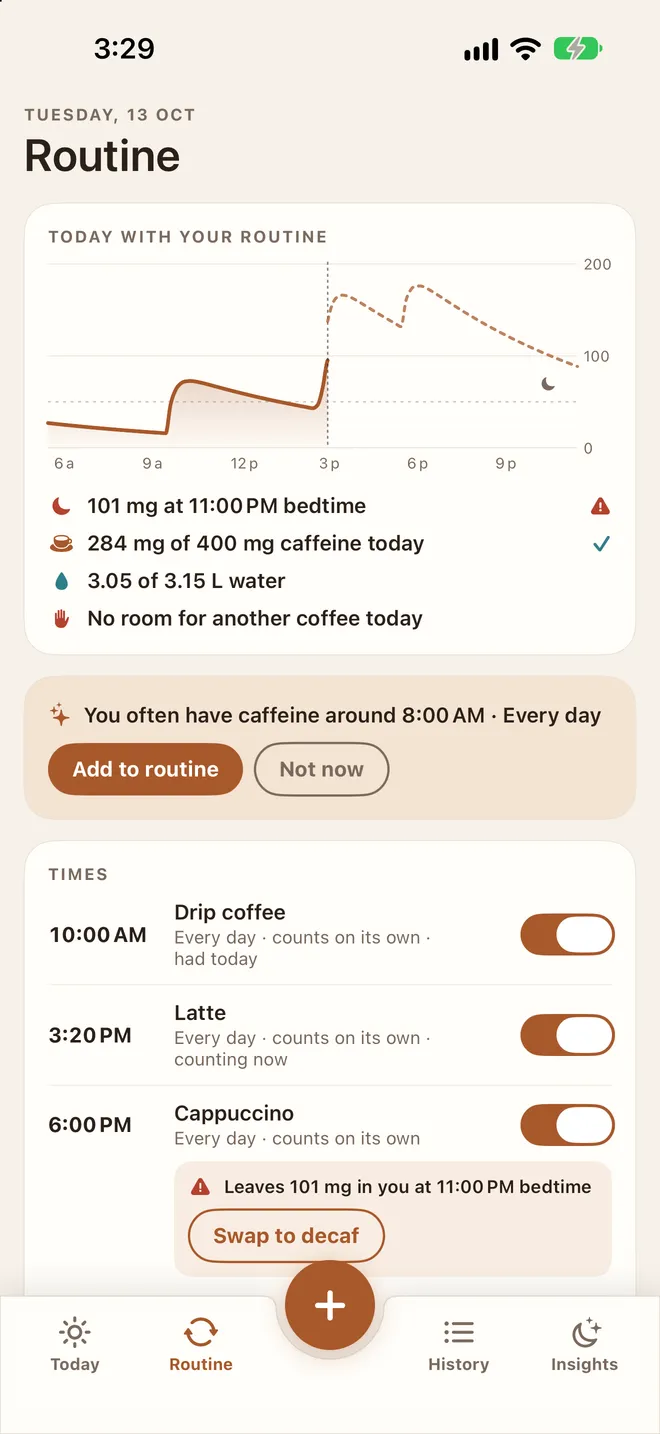
Tell it what you usually have and when. A few minutes before, it asks Had it or Skip. Say nothing and it counts. Save your café, and your usual order counts once you've been there 20 minutes.
If a planned drink would cost you sleep, it says so ahead of time, with Swap to decaf or Move it earlier. Each evening, a quick Day review lets you fix anything.
Tonight
See bedtime before it gets here.
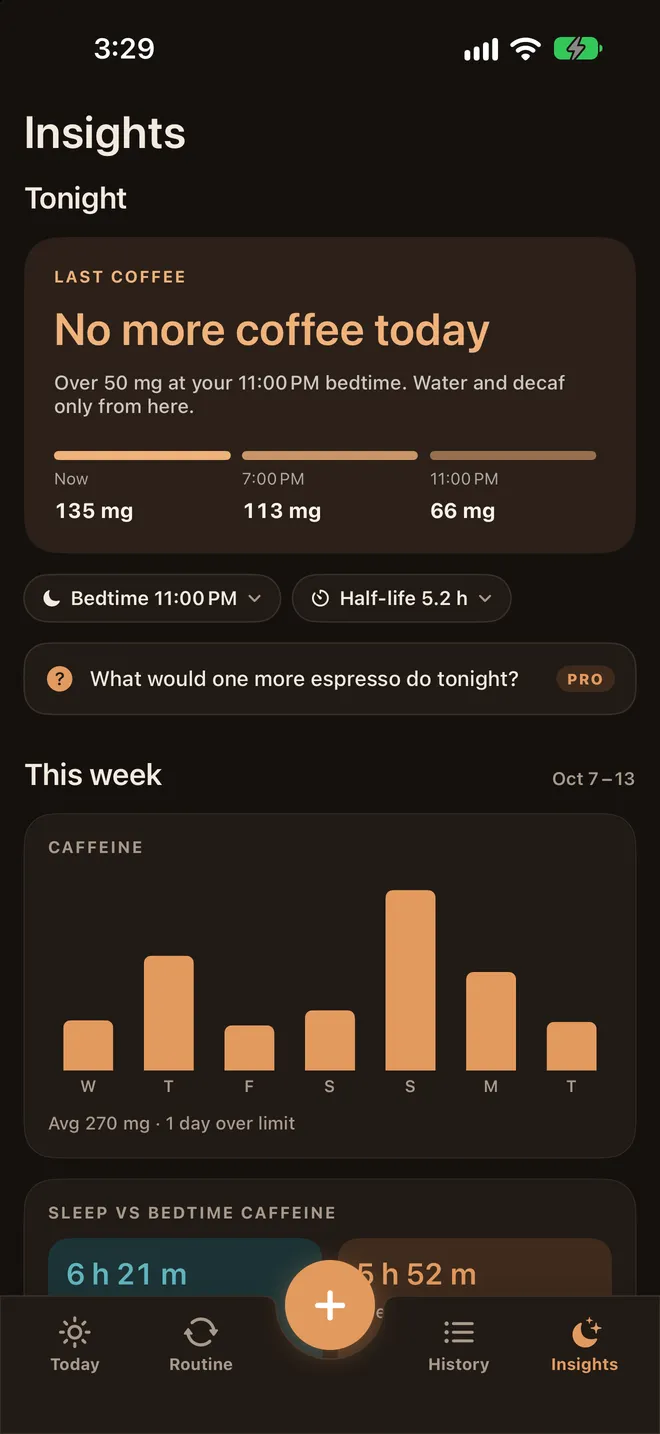
Insights opens on tonight: your Last coffee time, and how much caffeine you'll have now, this evening and at bedtime. Tap Bedtime or Half-life to make it yours, from Typical to Hits me hard, On the pill or Pregnant.
Once no more coffee fits, it goes dark: a gentle signal to wind down. This week shows your caffeine day by day, and with Apple Health, how it lines up with your sleep.
Water
Water keeps pace with your day.
1.75 L of 3 L
- 💧A goal that fits youFrom your weight, how active you are and the weather where you live.
- ⏱On pace, or behindToday shows where you are for the time of day, with a +250 ml button always there.
- ☕Coffee countsCoffee and tea hydrate about as well as water. After a strong one, it reminds you to pair it with a glass.
A day with Caffeine vs Water
Coffee in the morning. A latte after lunch. Asleep by eleven.
- Your usual coffee, counted.Your routine logs the drip coffee. Today now reads Last coffee by 2:45 PM.
- A little behind on water.Today shows you're 0.4 L behind pace. One tap on +250 ml.
- A latte, with room to spare.It fits: about 36 mg left at bedtime.
- Tempted by a cold brew?It warns you first: that would leave about 106 mg at bedtime. A decaf leaves 37 mg.
- Day review.“Your routine counted 2 drinks today.” Looks right.
- Lights out, under the line.About 36 mg left, below the 50 mg sleep line.
Worked out with the app's model for a typical 5.5-hour half-life.
Wherever you are
Two seconds to log. Often zero.
All of this is free.
Apple Watch
Caffeine now, Quick log and the warning, on your wrist. Water by the Digital Crown.
Widgets
Caffeine and water on your Home Screen and Lock Screen, with Quick log you can tap.
Siri & Shortcuts
“Log a latte.” “Can I still have coffee?” Works from the Action button too.
Live Activities
A heads-up before each routine drink, with Had it and Skip on the Lock Screen.
Apple Health
Caffeine and water go to Health. Your sleep can set your bedtime.
600+ drinks
Coffee-chain sizes, teas, sodas and energy drinks, plus your own.
Honest and private
No account. No ads. No guesswork.
Your drinks stay on your iPhone and in Apple Health. The app shows its working: Settings › How we calculate lists the model and every study behind it.
“Does coffee dehydrate you?” No.
For regular coffee drinkers, a moderate cup hydrates about as well as water. We pair a glass with strong coffee because it's a good habit and it keeps your goal honest, not because coffee is “cancelling out” your water.
Why 50 mg at bedtime?
Caffeine blocks the signal that makes you sleepy, and studies see sleep suffer even when you fall asleep fine. Staying under about 50 mg at lights-out, about half a cup of coffee, is a sensible target.
Free tools
Work it out now, no app needed.
Calculator
Caffeine at bedtime
Add up to six drinks and see what's left at lights-out, hour by hour.
Calculator
When to stop drinking coffee
The latest time for your drink, for your bedtime and how caffeine hits you.
Calculator
How long caffeine stays in you
Hour by hour, until it's gone, with the half-life that fits you.
Calculator
How much water you need
A daily goal from your weight, activity and climate. Coffee counts.
Popular guides
The science, in plain English.
Coffee chains
How much caffeine is in Costa coffee?
Every drink and size, from a 100 mg shot to a 400 mg large cappuccino.
Sleep
Is 2 pm too late for coffee?
What a 2, 3 or 4 pm drink still leaves at bedtime.
Hydration
Signs of dehydration
The symptoms, a urine colour chart and when to get help.
Sleep
When to stop drinking coffee before bed
A cutoff for every drink, by dose, not guesswork.
Energy drinks
Energy drinks and sleep
23 cans ranked by the hours they need before bed.
Caffeine chart
Caffeine content chart
Coffee, tea, soda and energy drinks side by side, by size.
Good to know
Questions, answered.
What is Caffeine vs Water?
An iPhone and Apple Watch app that tracks caffeine and water together. It predicts how much caffeine will still be in you at bedtime, tells you the latest time for your next coffee, warns you before a drink that would cost you sleep, counts your usual drinks for you, and keeps your water on pace with a daily goal.
Is it free?
The beta is free. When it launches, everything that protects your sleep stays free: the bedtime forecast, your last-coffee time, the warnings, routine times, water, the Apple Watch app, widgets and Siri. A few extras, like counting drinks when you arrive at your café, will be part of an optional Pro.
How does it know my last coffee time?
It adds up every drink you've had, and the ones your routine still expects, using the standard caffeine model: absorbed in about 45 minutes, then half cleared every 5.5 hours for most people. It then works out the latest time a drink can leave you under 50 mg at bedtime. If caffeine hits you harder, or you're pregnant or on the pill, pick that setting and the times move earlier.
Do I have to log every drink?
No. Add your usual drinks to your routine and they count themselves at their times, with Had it and Skip before each one. Anything extra is two taps in Quick log, on your Watch, with Siri or from a widget.
Does coffee count toward my water?
Yes. For regular coffee drinkers, a moderate cup hydrates about as well as water, so its volume counts toward your goal. The app only suggests a glass of water with strong drinks, as a habit.
What happens to my data?
There's no account. Your drinks stay on your iPhone and in Apple Health, and saved places never leave your iPhone. No ads, no tracking.

Coffee now. Sleep later.
Caffeine vs Water is in free beta on TestFlight. Join and Apple will email you an invite for iPhone and Apple Watch.
Needs an iPhone with iOS 26 or later. We pass your email to Apple to send the TestFlight invite. Privacy